Braga, Portugal · open to iOS roles

Lauro Marinho

iOS Developer — Swift · SwiftUI · watchOS · AVFoundation

I build native iOS apps end to end — architecture, SwiftUI, StoreKit 2, tests, App Store release and the metrics afterwards. Professionally I work across a six-app portfolio: health widgets on HealthKit and WidgetKit, an AI nutrition tracker with Siri and Apple Watch, and a professional video colour-grading app where I own the colour science. In my own time I design and ship my own products.

~580commits in 12 months, across 6 production repos
150+pull requests reviewed and merged
4.4★App Store rating on Hidgets, 500+ ratings
3own products designed and built solo

My own products

Apps I designed, built and shipped myself

Product definition, architecture, code, design system, monetisation and store listing — all mine. These are the ones I care most about.

ArtistLab

Submitting to App Review

Turn a reference photo into a palette you can actually paint from.

Painters work from photographs all the time, and the hard part is not picking colours — it is understanding how they relate. ArtistLab extracts a living palette from any photo, then lets you rebuild it: rotate harmonies, study the distribution on the wheel and preview how a paint really reads over the background you plan to use.

  • Colour Lab — colour wheel, harmonies and distribution analysis of your reference
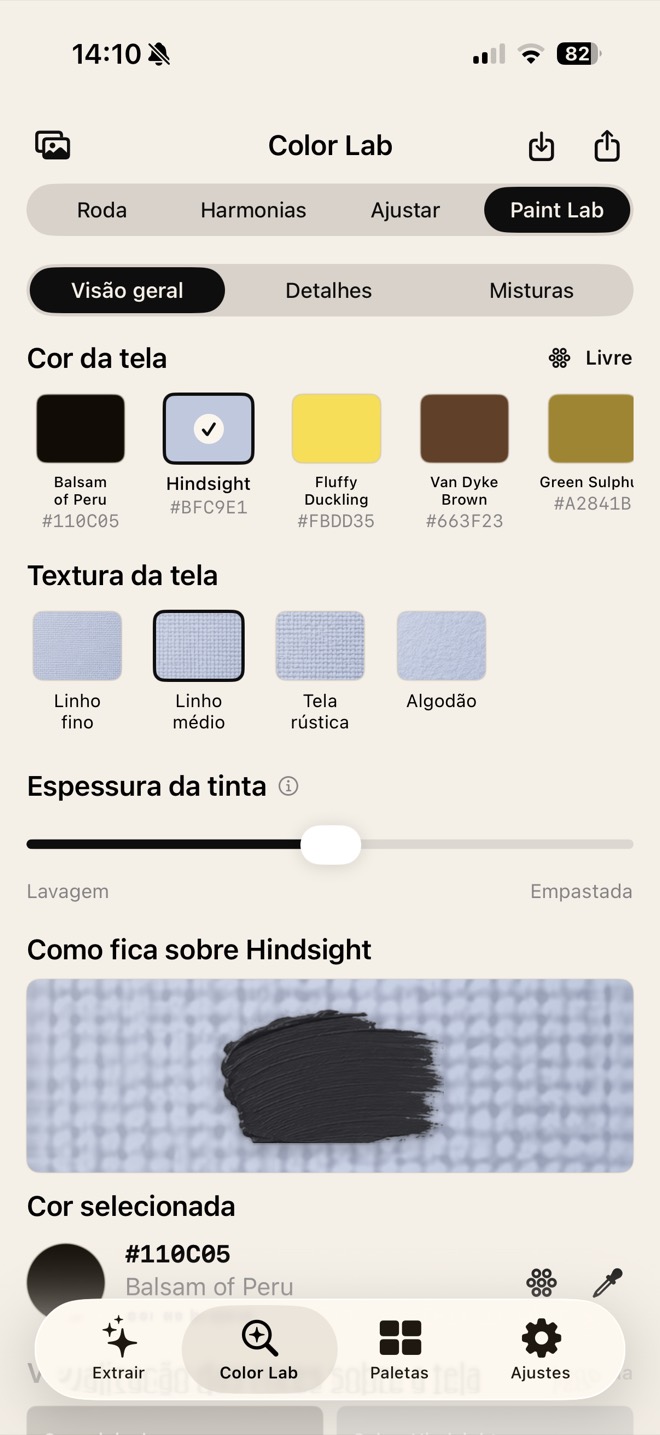
  • Paint Lab — paint appearance over a chosen background: opacity, coverage, texture
  • Non-destructive by design — one source of truth, so editor, library, preview and export can never disagree
  • Local library and export — everything works offline, on device
  • ArtistLab Pro — StoreKit 2 subscription with restore, entitlement checks and a free tier that never locks you out of your own work
SwiftUISwiftDataObservation StoreKit 2PhotosUICore Graphics Swift TestingiOS 18
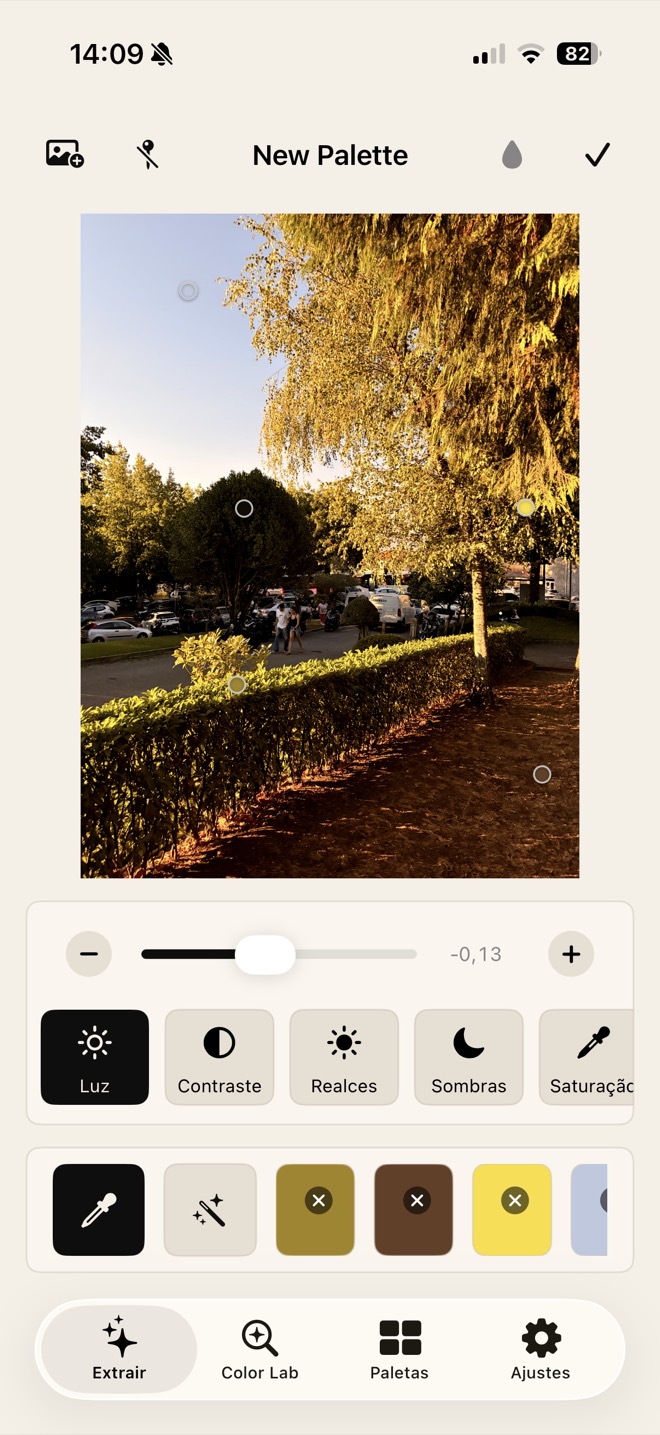
ArtistLab — palette extracted from a reference photograph
Screenshot 1artistlab-1.jpg
ArtistLab — Paint Lab: how a paint reads over a chosen canvas
Screenshot 2artistlab-2.jpg

MyMood

On the App Store

A mood journal that feels like a real diary, not a form.

Most mood trackers are a rating and a text field. MyMood is built around the object it is imitating: you pick a cover, a paper, the ornaments and the ruling, and the app that comes out the other side is yours. Underneath it is a proper journal — entries with photos and voice, a calendar, and charts that show what the last month actually looked like.

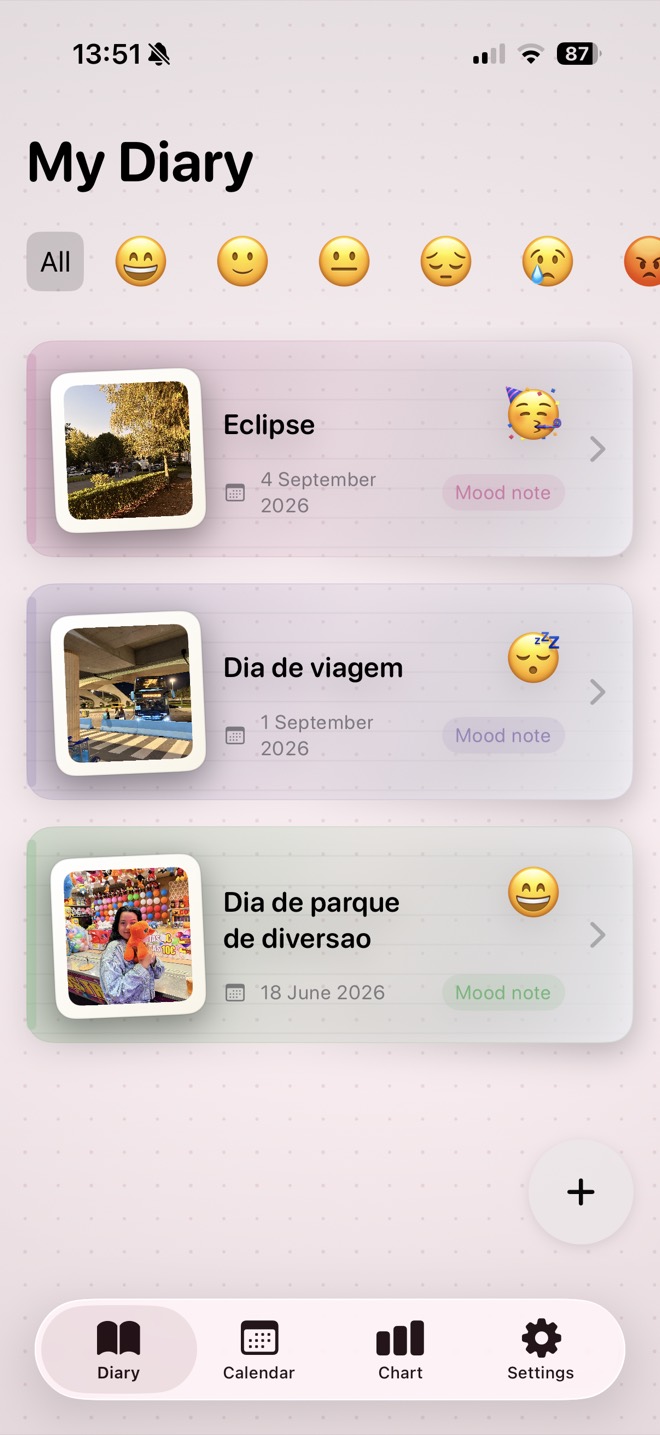
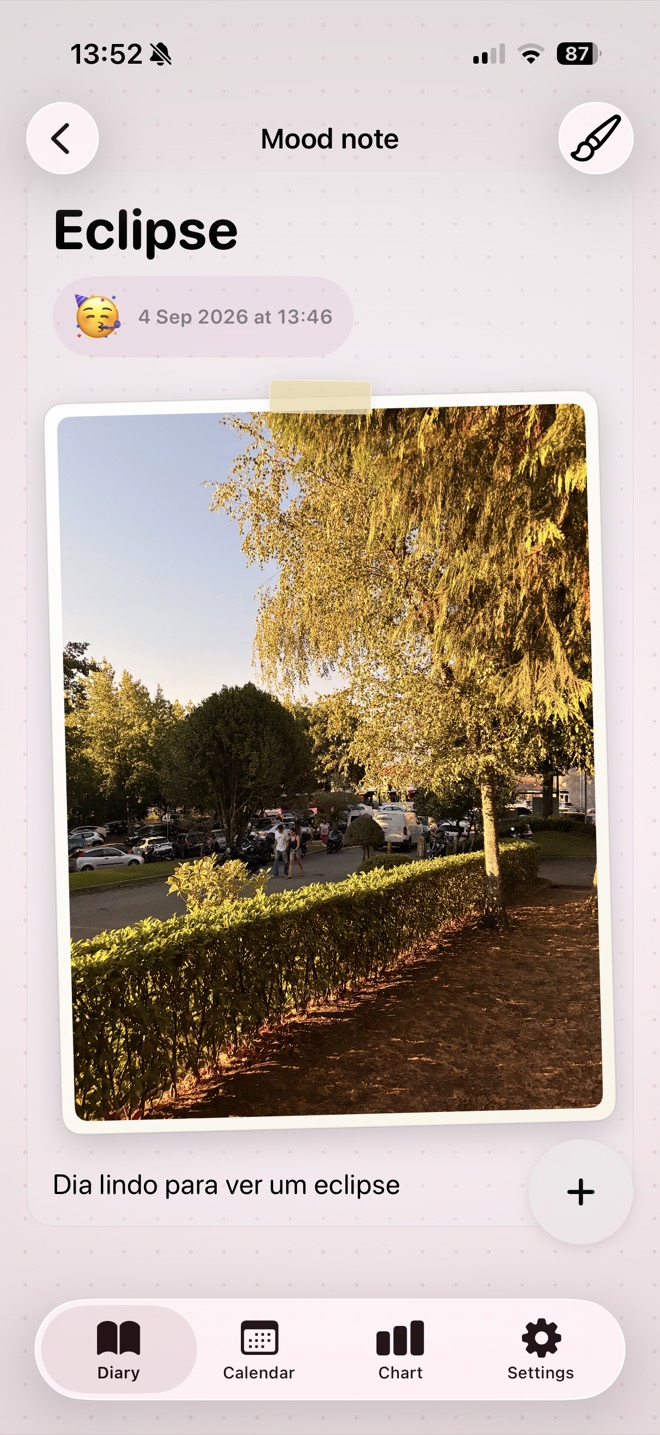
  • Entries with mood, notes and photos, plus voice dictation for the days you would rather talk than type
  • Insight charts in Swift Charts, with a calendar and daily agenda
  • Biometric app lock — a private journal has to actually be private
  • A design system of covers, papers, ornaments and rulings built as composable tokens
  • Reminders, so the habit survives the first week
SwiftUICore DataSwift Charts SpeechAVAudioEngine LocalAuthenticationPhotosUI

The screens above are from the 2.0 update, still in progress — the version currently on the App Store looks different.

MyMood — the diary, with entries filtered by mood
Screenshot 1mymood-1.jpg
MyMood — a journal entry with photo and note
Screenshot 2mymood-2.jpg

StoreFlow

Pre-launch

Stock control for small shops, without the typing.

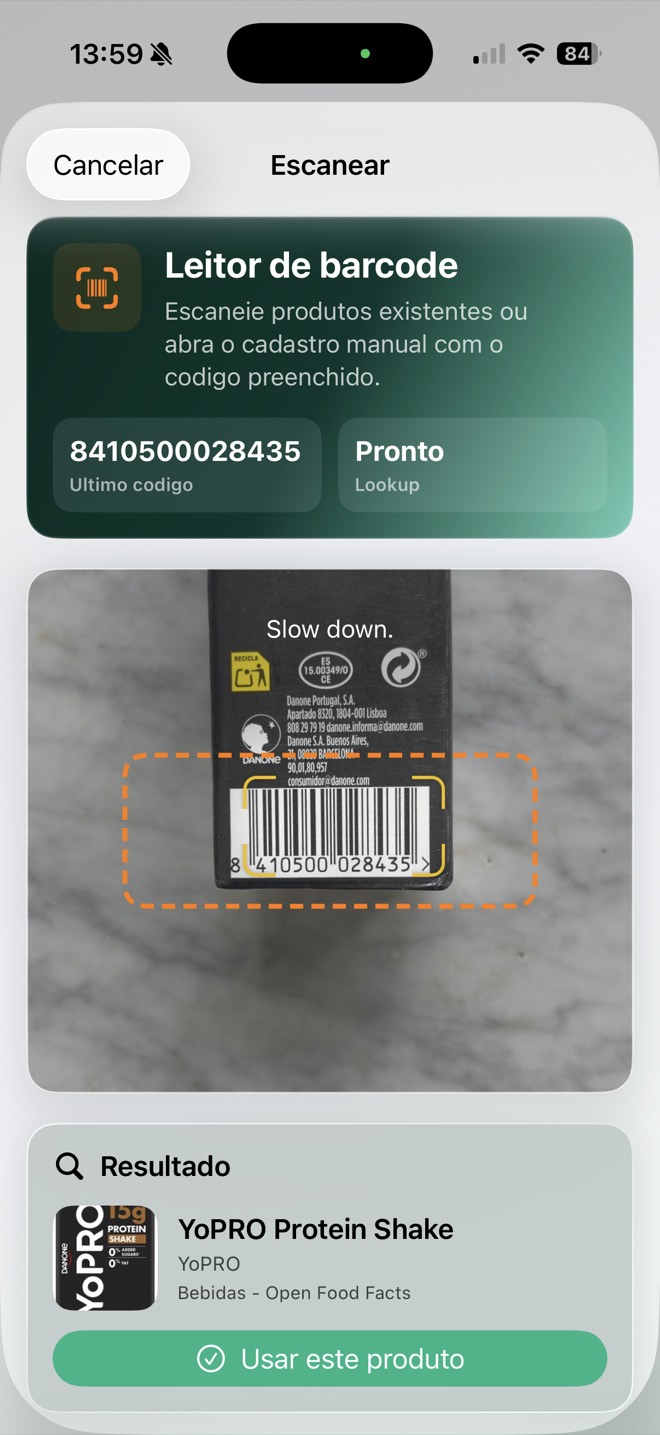
Inventory apps fail for the same reason: nobody wants to type. StoreFlow removes the keyboard from the critical path — scan the barcode, or say what came in and confirm it — and turns what is left into a dashboard the owner will actually read.

  • Barcode scanning with VisionKit for fast in and out
  • Voice logging with confirmation, so a mis-heard number never silently lands in the data
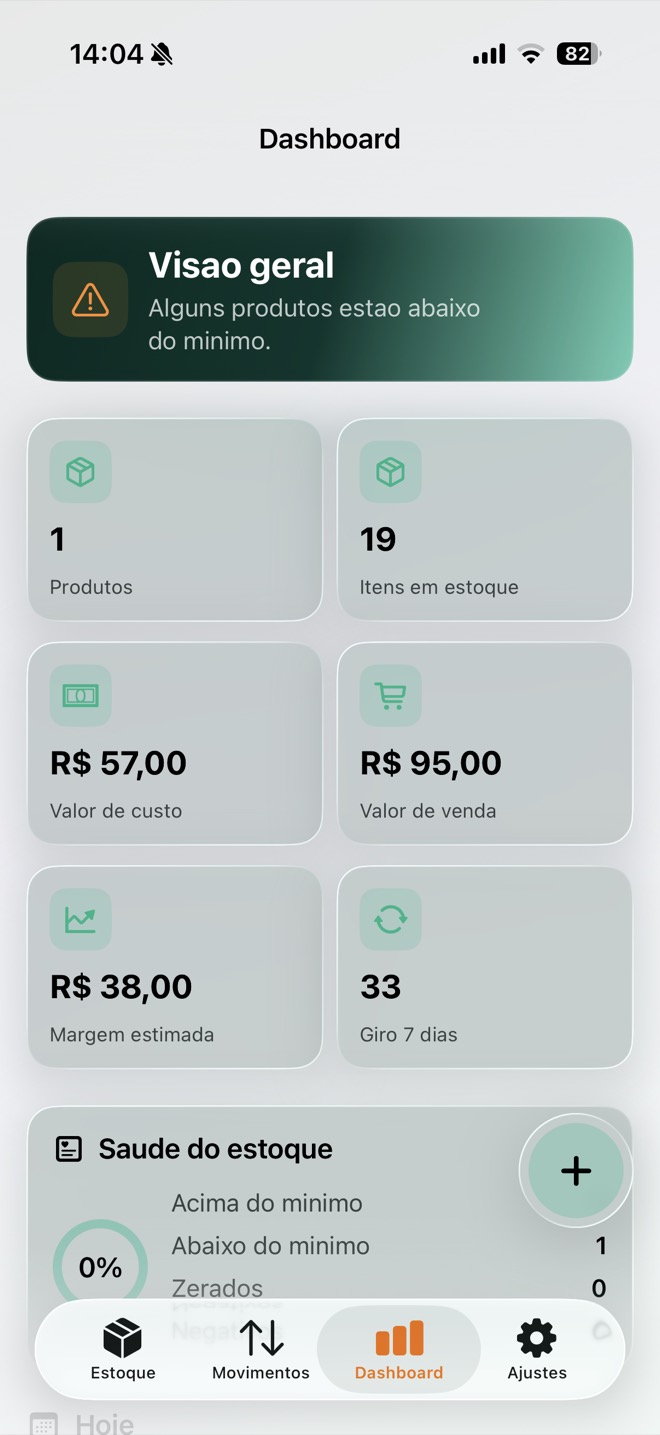
  • Metrics dashboard in Swift Charts, plus CSV export for the accountant
  • Swift 6 with feature-based MVVM, a services layer and its own design system
Swift 6SwiftUISwiftData VisionKitSpeech Swift ChartsSwift Testing
StoreFlow — the stock dashboard
Screenshot 1storeflow-1.jpg
StoreFlow — scanning a product barcode
Screenshot 2storeflow-2.jpg

Professional work

Shipped with a team

Twelve months at PictoMessages (PluginsLab) as the iOS developer on the company's portfolio — about 580 commits across six repositories, every one of them through a reviewed pull request.

Hidgets

App Store · 4.4★

Health data as Home and Lock Screen widgets.

What I built

  • HealthKit integration and the profile system
  • WidgetKit widgets and Apple Watch complications with adaptive sizing per watch model
  • Subscriptions and PRO gating with StoreKit and App Groups, consistent across app, widgets and watch
  • Siri App Intents, and performance work on chart rendering and widget reloads
HealthKitWidgetKitwatchOS StoreKitApp IntentsApp Groups

Nutrition tracker

Unreleased

Nutrition logging, assisted by AI.

Name withheld — final steps before release.

What I built

  • Onboarding, barcode scanning, product editing and the recipe editor in SwiftUI
  • AI food logging from scratch — the data model, token handling, editing UI, edge cases and its test coverage
  • The Apple Watch app from the ground up: WatchConnectivity, watch-side logging, Smart Stack complications
  • App Intents for Siri and Shortcuts; UI tests and accessibility identifiers
SwiftUIwatchOSWatchConnectivity App IntentsVisionXCTest

Video colour grading

Unreleased

Professional colour grading for video, on iOS.

Name withheld — final steps before release.

What I built

  • Colour science, solo — Apple Wide Gamut modelling, Apple Log 2 primaries, automatic gamut detection
  • Colour-managed sources, so preview and export grade identical pixels
  • The AVFoundation export chain: multi-clip sequences, per-segment audio, proxies, histogram
  • A 16-bit float working space for the node graph, and the fixes that stopped preview running out of memory
AVFoundationMetalCore Image Colour scienceProRes

These are products of PictoMessages, Lda. (PluginsLab); what is described above is my own contribution to them. Two of the three are not released yet, so they are unnamed here — happy to talk through the detail in an interview.

Toolbox

What I work with

Language & UI

SwiftSwiftUIUIKit (ViewCode) SpriteKitSwift Concurrency async/awaitactors@MainActor

Apple platforms

iOSwatchOSWidgetKit HealthKitApp Intents / Siri WatchConnectivityApp Groups StoreKit 2LocalAuthentication

Media & graphics

AVFoundationMetalCore Image Core GraphicsVision / VisionKit SpeechSwift Charts colour management

Data & architecture

Core DataSwiftDataObservation REST / JSONFirebase MVVMfeature modulesSPM

Quality & delivery

XCTestSwift TestingUI tests accessibility identifiersInstruments FastlaneGitHub Actions TestFlightApp Store Connect

AI in the workflow

Claude Code in productionCLAUDE.md context files MCP serversin-app AI features

Let's build something

I am open to iOS roles — in Portugal, elsewhere in Europe or remote. If you want the detail behind any of the work above, ask me about the colour science.